First primary care visit checklist for telehealth success

Scheduling your first telehealth primary care visit is a meaningful step toward consistent, relationship-centered health care. But it’s completely normal to wonder: What do I actually need to have ready? Many patients arrive at their first virtual appointment feeling underprepared, and that uncertainty can make the experience feel rushed or incomplete. A clear, practical checklist changes that. When you know exactly what to gather, how to set up your space, and what questions to ask, you walk into that video call with confidence and leave with real answers.
Table of Contents
- What to gather before your first telehealth visit
- Set up your technology and environment
- Checklist comparison: What’s required, recommended, or optional?
- Extra considerations: Accessibility, costs, and getting support
- What most telehealth checklists miss: Building a real connection from any device
- Your next step: Start your primary care journey with support
- Frequently asked questions
Key Takeaways
| Point | Details |
|---|---|
| Medication and symptoms summary | Having a detailed list of medications and your main concerns leads to better care during your first visit. |
| Tech readiness matters | Testing your device and connection ensures your telehealth appointment goes smoothly. |
| Home health readings help | Sharing recent readings from at-home devices can give your provider valuable information. |
| Plan for accessibility | Ask for accommodations or check coverage before your appointment if needed. |
| Build a real connection | Using your first visit to start a relationship helps your provider meet your ongoing needs. |
What to gather before your first telehealth visit
Now that you know a checklist can simplify your appointment, let’s break down exactly what to have on hand before you log in. Being prepared with the right documents and information is the single most effective way to make your visit productive. Your provider can only help you as well as the information you bring allows.
According to the expert checklist from the American Heart Association, a first virtual visit should include a medication list, a symptom summary, insurance details, and relevant records. Here is exactly how to build each of those items before your appointment:
-
Medication list with dosages and supplements. Write down every prescription medication you take, including the dose and how often you take it. Add over-the-counter medications, vitamins, and herbal supplements. Providers need this full picture to avoid drug interactions and make safe treatment decisions. A photo of your pill bottles works well if you’re short on time.
-
Symptom or concern summary. Before your visit, write a brief note about what’s bothering you. When did it start? Has it gotten better or worse? Does anything make it feel different? Being specific here helps your provider understand the full picture without spending valuable appointment time on back-and-forth clarification.
-
Insurance card and photo ID. Even for a virtual visit, your provider’s office needs to verify your identity and confirm your insurance coverage. Have your card visible or take a photo of both sides ahead of time so you can share it quickly if asked.
-
Relevant medical records or recent test results. If you’ve had bloodwork, imaging, or specialist notes from another provider, bring copies or know where to access them digitally. This is especially important if you’re managing a chronic condition like diabetes, hypertension, or thyroid disease and your new provider doesn’t yet have your history.
-
At-home device readings, if available. If you own a blood pressure cuff, glucose meter, pulse oximeter, or thermometer, take a reading before your visit and write it down. These numbers give your provider objective data to work with, which is particularly valuable when you can’t be examined in person.
Pro Tip: Keep a running note on your phone called “health log” where you jot down any symptoms, readings, or medication changes as they happen. When your appointment arrives, you’ll have everything in one place without scrambling.
Taking 15 to 20 minutes the day before your visit to gather these items is one of the most respectful things you can do for both yourself and your provider. It signals that you’re invested in your own health, and it allows the conversation to go deeper than it otherwise would.
Set up your technology and environment
Once your documents and records are ready, step two is making sure the technical setup won’t let you down. Technology issues are the most common reason telehealth appointments feel frustrating. A dropped connection or a malfunctioning microphone can cut a visit short and leave important questions unanswered.
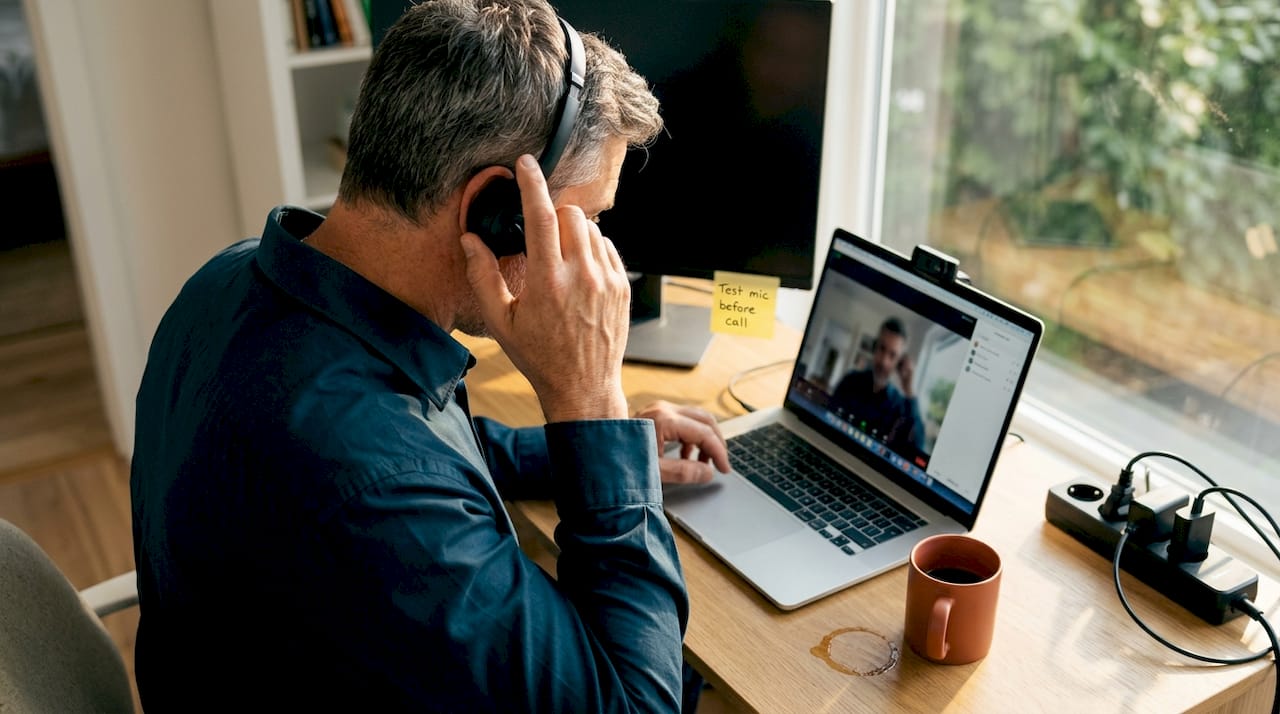
The U.S. Department of Health and Human Services recommends that patients review telehealth visit tips before their appointment, including testing their device and connection, confirming the portal or app they’ll use, and selecting a quiet, well-lit, private space.
Here’s a practical setup checklist to work through the day before or morning of your visit:
- Test your camera and microphone. Open your device’s camera app or the telehealth platform and confirm both are working. Many platforms have a built-in test feature you can run before the actual call.
- Check your internet connection. A wired connection is most reliable, but if you’re using Wi-Fi, position yourself close to your router. Streaming video requires a stable connection of at least 10 Mbps for a smooth experience.
- Charge your device or plug it in. Nothing disrupts a visit like a low battery warning mid-conversation. Plug in your laptop, phone, or tablet before the appointment starts.
- Log in to the patient portal early. Try accessing the portal or clicking the appointment link at least 15 minutes before your scheduled time. This gives you a buffer to troubleshoot any login issues without cutting into your appointment.
- Choose a quiet, private space with good lighting. Natural light facing you (rather than behind you) makes it easier for your provider to see your face clearly. A private room reduces background noise and protects your personal health information.
- Download any required apps ahead of time. Some telehealth platforms require a specific app. Don’t wait until two minutes before your appointment to discover you need to download something.
Pro Tip: Do a full test run the evening before your appointment. Call a family member or friend using the same device and platform to confirm everything works as expected. This removes any last-minute surprises.
A well-prepared technical setup communicates something important: you’re taking this visit seriously. And when your provider can see and hear you clearly, they can focus entirely on your health rather than troubleshooting the connection.
Checklist comparison: What’s required, recommended, or optional?
To make it even simpler, here’s a side-by-side look at what to prioritize for your first remote primary care checkup. Not everything on a preparation list carries equal weight, and understanding the difference helps you focus your energy where it matters most.
| Checklist item | Priority level | Why it matters |
|---|---|---|
| Medication list with dosages | Required | Essential for safe prescribing and avoiding interactions |
| Symptom or concern summary | Required | Guides the clinical conversation and diagnosis |
| Insurance card and photo ID | Required | Needed for billing and identity verification |
| Stable internet connection | Required | Without it, the visit cannot happen |
| Working camera and microphone | Required | Core technology for a video visit |
| Recent medical records or lab results | Recommended | Provides clinical context, especially for chronic conditions |
| Patient portal login confirmed | Recommended | Avoids delays at the start of the visit |
| Quiet, private space | Recommended | Protects privacy and improves communication quality |
| At-home device readings (BP, glucose, temp) | Recommended | Adds objective data your provider can act on |
| Dedicated telehealth app downloaded | Recommended | Prevents last-minute technical issues |
| List of questions for your provider | Optional but valuable | Helps you use your time efficiently |
| Family health history notes | Optional but valuable | Useful context for long-term care planning |
The American Heart Association’s How to get ready checklist specifically highlights at-home health device readings as meaningful tools for remote decision-making. If you manage blood pressure, blood sugar, or another measurable condition, having recent readings available during the call is one of the most useful things you can do.
“If you have at-home devices like a blood pressure cuff, glucose meter, or thermometer, bring those recent readings to your visit. Your provider can use that real-world data to make more informed decisions about your care, even without a physical exam.”
This is especially true for patients managing chronic conditions. A blood pressure reading taken in your own home, under your normal daily conditions, is often more clinically meaningful than a reading taken in a clinical setting where anxiety can temporarily elevate numbers.
Extra considerations: Accessibility, costs, and getting support
While most items are universal, some patients may need a little extra preparation. Let’s explore those scenarios next. If you have specific accessibility needs, cost concerns, or limited experience with technology, a few additional steps before your visit can make a significant difference.
The U.S. Department of Health and Human Services emphasizes that patients who need accommodations should ask for understanding telehealth support before their visit, and that confirming costs and coverage ahead of time is equally important.
Here are the key areas to address:
- Accessibility accommodations. If you use a screen reader, rely on closed captioning, or need a language interpreter, contact the provider’s office before your appointment. Most telehealth platforms support these features, but they often need to be activated in advance. Don’t wait until the day of the visit to ask.
- Technology support. If you’re not comfortable using video call technology, ask a family member or caregiver to help you set up. Many providers, including those using a relationship-based model, are happy to walk you through the process over the phone before your first visit.
- Insurance and cost confirmation. Telehealth coverage varies by insurance plan. Call your insurance provider or the practice’s billing team before your appointment to confirm what’s covered and what your out-of-pocket cost will be. This prevents unexpected bills and removes a source of stress from the visit itself.
- Know who to contact for support. Have the practice’s phone number and technical support contact saved before your appointment. If something goes wrong, you’ll know exactly who to call.
| Situation | Action to take | When to do it |
|---|---|---|
| Need closed captioning or screen reader | Contact the office to request setup | At least 2 days before visit |
| Need a language interpreter | Request through the provider’s office | At least 3 to 5 days before visit |
| Unsure about insurance coverage | Call your insurance or the billing team | Before scheduling or at booking |
| Not comfortable with video technology | Ask for a walkthrough from staff or family | Day before the appointment |
| Have a caregiver attending with you | Notify the provider’s office in advance | At scheduling or confirmation |
Being proactive about these details isn’t just practical. It reflects the kind of collaborative relationship that makes primary care work well over time. When your provider knows your needs from the start, they can build a care plan that genuinely fits your life.
What most telehealth checklists miss: Building a real connection from any device
Finally, let’s go beyond the basics for a truly successful first visit. Most preparation guides stop at documents and tech. That’s helpful, but it misses something important: your first telehealth appointment is also the beginning of a clinical relationship.
We’ve seen many patients arrive perfectly prepared with their medication lists and stable Wi-Fi, only to leave the visit feeling like they didn’t fully communicate what they needed. The reason is almost always the same. They focused entirely on logistics and forgot that this visit is also a conversation.
Telehealth can be just as personal as an in-person appointment when you approach it intentionally. Share context your provider wouldn’t otherwise know. Mention that heart disease runs in your family. Tell them you’ve been under unusual stress at work. Note that your child’s sleep has been disrupted for weeks. These details don’t show up on a lab report, but they shape clinical decisions in meaningful ways.
Ask your provider directly what to expect from follow-up. How will results be communicated? What’s the best way to reach them between visits? How often should you check in if you’re managing a chronic condition? These questions set the tone for a long-term partnership rather than a one-time transaction.
The most prepared patients we work with aren’t just the ones with organized paperwork. They’re the ones who come ready to talk, to listen, and to invest in a relationship that will serve their health for years. That mindset is the real foundation of a successful first visit.
Your next step: Start your primary care journey with support
If you’re ready to take the next step in accessible, relationship-centered care, here’s how to get started.
At Anchor Health, we built our practice around the idea that primary care should feel like a partnership, not a transaction. Our Anchored Care℠ model is designed to give Maryland patients the time, continuity, and personalized attention that most healthcare systems simply don’t offer.
Whether you’re scheduling care for yourself, your family, or managing a chronic condition, our telehealth services are designed to meet you where you are. For patients navigating specific health transitions, we also offer dedicated resources like guidance on navigating perimenopause remotely. Ready to get started? Visit Anchor Health to learn more about our services, insurance options, and how to book your first visit. Your first appointment is the beginning of something consistent, attentive, and built around you.
Frequently asked questions
What do I do if I can’t connect to my telehealth appointment?
Reach out to your provider’s office immediately for technical support, and try restarting your device or switching to a different network. Reviewing visit preparation tips ahead of time can help you avoid connection issues before they happen.
Is it necessary to have at-home health devices for a telehealth visit?
It’s not required, but sharing readings from devices like a blood pressure cuff or glucose meter helps your provider make more informed decisions. The American Heart Association’s readiness checklist specifically lists these as valuable tools for remote care.
How can I request accessibility accommodations for my telehealth visit?
Contact the provider’s office at least two to three days before your appointment to request support like closed captioning, a screen reader, or a language interpreter. The HHS telehealth guidance recommends asking for accommodations well before your visit date.
What’s the most important thing to have ready for my first virtual primary care visit?
A current medication list and a clear summary of your symptoms or concerns are the most essential items to prepare. The American Heart Association’s first visit checklist confirms these as the foundation of a productive telehealth primary care appointment.
Recommended
Article generated by BabyLoveGrowth
Blog & Information Disclaimer
Last Updated: May 23, 2026
The information provided on the Anchor Health website (https://myanchorhealthpc.com/), including but not limited to blog posts, articles, newsletters, graphics, and other materials (collectively, the "Content"), is for general informational and educational purposes only.
By accessing and using this website, you acknowledge and agree to the following terms and conditions:
The Content on this website is not intended to be a substitute for professional medical advice, diagnosis, or treatment. Always seek the advice of your physician, nurse practitioner, or other qualified health provider with any questions you may have regarding a medical condition. Never disregard professional medical advice or delay in seeking it because of something you have read on this website.
Reading, interacting with, or sharing the Content on this website does not establish a patient-provider relationship between you and Anchor Health or any of its clinicians, including Paule Valery Joseph, PhD, MBA, CRNP, FAAN. A formal patient-provider relationship is only established after you have completed the formal intake process, signed our clinical consent forms, and participated in a secure clinical consultation.
If you are experiencing a medical emergency, call 911 or seek emergency medical services immediately.
Anchor Health is a primary care practice and does not provide emergency or crisis intervention services through its website or blog.
While Anchor Health strives to provide thoughtful, evidence-based information grounded in our Anchored Care℠ model, healthcare is a rapidly evolving field. We make no representations or warranties, express or implied, about the completeness, accuracy, reliability, or suitability of the information contained in the Content. Any reliance you place on such information is strictly at your own risk.
Anchor Health is a telehealth practice providing services to patients physically located within the state of Maryland. The information provided on this blog is intended for residents of Maryland and is governed by the laws and regulations of that state. Accessing this information from outside of Maryland does not imply that our clinicians are licensed to practice medicine or provide consultations in your jurisdiction.
Content related to Weight & Metabolic Health, including discussions of GLP-1 medications or other medical therapies, is provided for educational context regarding our clinical approach. Prescriptions and specific medical recommendations are only made following a comprehensive clinical evaluation, diagnostic testing, and shared decision-making within a formal patient-provider relationship.
This website may contain links to external websites that are not provided or maintained by or in any way affiliated with Anchor Health. Please note that Anchor Health does not guarantee the accuracy, relevance, timeliness, or completeness of any information on these external websites.
To the fullest extent permitted by law, Anchor Health, its owners, and its employees shall not be liable for any direct, indirect, incidental, consequential, or punitive damag
Related posts