How to Transition In-Person Care to Telehealth

Waiting three weeks for a 15-minute appointment, then sitting in a crowded waiting room for another hour, is a frustrating experience most families know well. When you finally see your doctor, the visit feels rushed. The decision to transition in-person care to telehealth is often born from exactly that kind of exhaustion. Telehealth is no longer a pandemic workaround. It is a permanent model of primary care that delivers real continuity, genuine convenience, and better access for busy families and individuals managing ongoing health needs.
Table of Contents
- Key takeaways
- What you need before shifting to telehealth
- How to switch to telehealth step by step
- Troubleshooting common challenges
- What to expect after making the switch
- My perspective on balancing virtual and in-person care
- Ready to make your telehealth transition easier?
- FAQ
Key takeaways
| Point | Details |
|---|---|
| Prepare your technology first | Confirm your device, internet speed, and app setup before your first virtual visit. |
| Verify insurance coverage | Call your insurer to confirm telehealth benefits and copay structure before scheduling. |
| Follow a clear transition process | Use a step-by-step approach: find a provider, set up a patient portal, and prep your environment. |
| Expect measurable improvements | Virtual-first care can cut wait times significantly and reduce costs per visit. |
| Know when to go in person | A hybrid model works best; some conditions and treatments still require physical presence. |
What you need before shifting to telehealth
Before your first virtual visit, a little preparation goes a long way. The good news is that most families already have what they need. The setup is simpler than most people expect.
Technology requirements
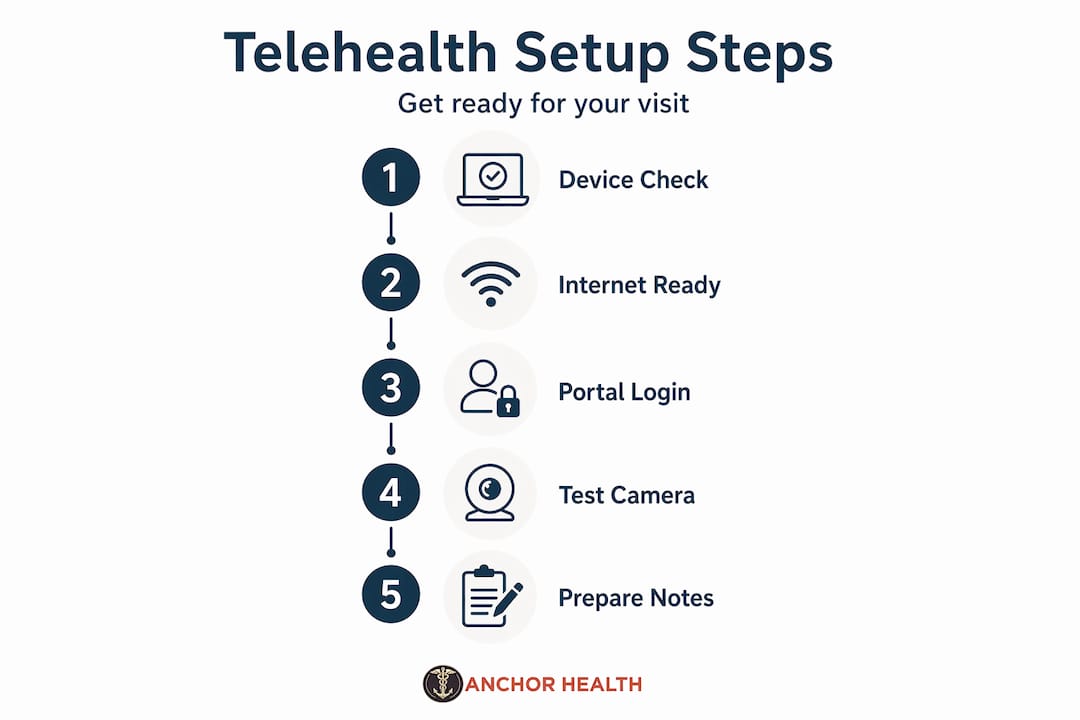
You need a device with a camera and microphone. A smartphone, tablet, or laptop all work well. Your internet connection should be stable enough to support a video call. A speed of at least 10 Mbps download is a reliable baseline. Most telehealth platforms also require you to download a specific app or access a secure web portal, so check with your provider in advance and test the link before your appointment day.
Insurance and coverage
Telehealth coverage has expanded significantly in recent years, but policies vary. Call your insurance company directly and ask two specific questions: Does my plan cover telehealth visits with my chosen provider? What is my copay for a virtual visit? Some plans treat telehealth visits exactly like in-person visits. Others have separate cost structures.
Pro Tip: Ask your insurer whether your plan covers both synchronous video visits and asynchronous messaging, since some plans only cover one type.
Patient portals and informed consent
Most telehealth providers require you to create a patient portal account before your first visit. This is where you will submit your medical history, sign consent forms, and receive visit summaries. Telehealth workflows require verified patient identity, documented informed consent, and clear communication protocols before care begins. Some states have specific requirements around consent documentation. Setting up your portal account at least 48 hours before your first appointment gives you time to complete these steps without rushing.
| Preparation step | What to do |
|---|---|
| Device and internet check | Test video and audio on your device; confirm stable connection |
| App or portal setup | Download required app or create patient portal account |
| Insurance verification | Confirm telehealth coverage and copay with your insurer |
| Informed consent | Complete consent forms in the portal before your visit |
| Medical history upload | Submit current medications, allergies, and health history |
How to switch to telehealth step by step
Once your technology and insurance are sorted, the actual transition process is straightforward. Here is a practical sequence that works for most patients and families.
-
Find a telehealth provider that fits your needs. Look for a provider who offers primary care, accepts your insurance, and has experience managing the conditions most relevant to your family. Read reviews and check whether the provider supports continuity, meaning you see the same clinician over time rather than a different person each visit.
-
Schedule your first virtual appointment. Most telehealth platforms let you book online. Choose a time when you will have 30 to 45 minutes of uninterrupted quiet. Avoid scheduling your first telehealth visit during a lunch break or between school pickups.
-
Complete your pre-visit setup. Log into the patient portal, upload your health history, fill out any intake forms, and sign consent documents. This step alone makes the actual visit more productive because your provider arrives informed.
-
Prepare your physical environment. Find a private, well-lit space. Natural light facing you works better than a window behind you. Sit at a table rather than a couch. Have a list of your current medications, your questions, and any symptoms you want to discuss written down and within reach.
-
Run a tech check 15 minutes before the visit. Open the app or portal link, test your camera and microphone, and close other applications that might slow your connection. This small step prevents the most common source of telehealth frustration.
-
Engage actively during the visit. Speak clearly, describe symptoms with specific detail (when they started, how they feel, what makes them better or worse), and ask your provider to explain anything you do not understand. Virtual visits reward patients who come prepared.
-
Follow up on next steps immediately after. Check your portal within 24 hours for visit notes, referrals, prescriptions, or lab orders. Telehealth workflows move quickly, and staying on top of follow-up tasks keeps your care on track.
Pro Tip: Keep a dedicated notebook for your telehealth visits. Write down your questions before each appointment and jot down the provider’s answers during the visit. This habit builds a personal health record that is genuinely useful over time.
Troubleshooting common challenges
Even with good preparation, challenges come up. Knowing how to handle them keeps your care on track.
- Audio or video problems: If your video freezes or audio cuts out, close the app and rejoin the session. If problems persist, switch from Wi-Fi to a mobile hotspot or vice versa. Most platforms also allow you to continue the visit by phone if video fails entirely.
- Privacy at home: Find a room where you can close the door. Use headphones to prevent others from hearing the provider’s responses. If you live with others, let them know you have a medical appointment and need privacy for 30 to 45 minutes.
- Prescriptions and medications: Most routine medications can be prescribed through telehealth. Controlled substances have more complex rules that vary by state and have changed since the pandemic. Ask your provider directly about their prescribing policies during your first visit so there are no surprises.
- Conditions that need in-person care: Telehealth is not appropriate for all interventions. Treatments like transcranial magnetic stimulation, ketamine infusions, or certain physical exams require your physical presence. A good telehealth provider will tell you clearly when an in-person visit is necessary and help coordinate that care.
Successful telehealth transitions work best when patients understand that virtual care complements rather than replaces in-person care when it is truly needed.
Advocating for a hybrid care model is not a compromise. It is smart healthcare. You can manage chronic conditions, routine check-ins, mental health follow-ups, and medication management virtually while reserving in-person visits for physical exams, procedures, or acute situations that genuinely require them.
What to expect after making the switch
The results of shifting to virtual healthcare are measurable and often faster than patients expect.
| Outcome area | What patients typically experience |
|---|---|
| Wait times | Primary care visits within 1 day vs. a 10-day average for in-person |
| Cost per visit | $79 average for virtual acute care vs. $146 in-person |
| Medication adherence | Virtual patients show 60% adherence vs. 50% with in-person care |
| Annual cost savings | Average of $468 per member per year with virtual-first programs |
Beyond the numbers, most patients report that virtual care feels less rushed. You are in your own space. You have your notes ready. Your provider has reviewed your history before the call begins. That combination tends to produce more focused, productive conversations.

Continuity matters too. Virtual health enables continuous chronic condition management rather than the episodic, location-based care that traditional systems often default to. If you have a condition like hypertension, diabetes, or anxiety, seeing the same provider consistently through telehealth can produce better outcomes than rotating through whoever is available at a walk-in clinic.
Reassess your experience after three to six months. Ask yourself whether your questions are being answered thoroughly, whether your care feels consistent, and whether follow-up is happening reliably. If the answer to any of those is no, it may be time to find a different telehealth provider rather than abandon virtual care entirely.
My perspective on balancing virtual and in-person care
I have worked with patients across a wide range of conditions and care needs, and the clearest lesson I have learned is this: the patients who do best with telehealth are the ones who treat it as a genuine healthcare relationship, not a transactional convenience.
What I have seen repeatedly is that people expect telehealth to feel like a lesser version of in-person care. It often turns out to be better, specifically because the patient is more comfortable, more prepared, and more willing to speak honestly when they are in their own home. That shift in environment changes the dynamic in ways that genuinely improve care quality.
Where I would push back on the all-virtual approach is around physical examination. There are real limits. A provider cannot listen to your lungs through a screen. They cannot assess a rash with the same precision as in person. The hybrid model is not a compromise. It is the most clinically sound approach for most families. Use virtual care for what it does exceptionally well: access, consistency, follow-up, and ongoing relationship-building. Reserve in-person visits for what truly requires them.
My honest advice is to be proactive and specific with your telehealth provider. Tell them what you need. Ask whether a given concern can be handled virtually or whether you need to be seen. A good provider will give you a straight answer, and that transparency is the foundation of care that actually works.
— Paule
Ready to make your telehealth transition easier?
At Myanchorhealthpc, we built our practice around exactly this kind of care: thorough, consistent, and designed for real life. Our Anchored Care℠ᴵᴾ model means you see the same provider every visit, your history is known, and your care is never fragmented.
Part of being ready for virtual visits means having the right tools at home. A reliable digital thermometer lets you share accurate readings with your provider during a visit rather than estimating. When hybrid care includes any in-person contact, having quality face masks on hand supports infection prevention for your whole family. Myanchorhealthpc offers these home health essentials alongside our telehealth services, so you have everything you need to stay prepared and connected to your care team. Visit myanchorhealthpc.com to learn more and schedule your first visit.
FAQ
What do I need to start a telehealth visit?
You need a device with a camera and microphone, a stable internet connection, and an account on your provider’s patient portal. Complete any intake forms and consent documents before your appointment for the smoothest experience.
Does insurance cover telehealth appointments?
Most major insurance plans now cover telehealth visits, though copay structures vary. Call your insurer directly to confirm your specific benefits before scheduling your first virtual appointment.
Which conditions can telehealth treat effectively?
Telehealth works well for primary care, chronic condition management, mental health follow-up, medication management, and routine check-ins. Some conditions requiring physical examination or procedures still need in-person care.
How much can I save by switching to telehealth?
Virtual acute care visits average $79 compared to $146 for in-person visits. Virtual-first programs have shown average savings of $468 per member per year.
How do I know if my telehealth provider is a good fit?
After three to six months, assess whether your questions are answered thoroughly, your care feels consistent, and follow-up happens reliably. Continuity with the same provider is one of the strongest indicators of a good telehealth relationship.
Recommended
- Digital Thermometer Archives – My Anchor Health PC – Maryland
- face mask Archives – My Anchor Health PC – Maryland
- Bandage Archives – My Anchor Health PC – Maryland
- Support Stick Archives – My Anchor Health PC – Maryland
Blog & Information Disclaimer
Last Updated: May 23, 2026
The information provided on the Anchor Health website (https://myanchorhealthpc.com/), including but not limited to blog posts, articles, newsletters, graphics, and other materials (collectively, the "Content"), is for general informational and educational purposes only.
By accessing and using this website, you acknowledge and agree to the following terms and conditions:
The Content on this website is not intended to be a substitute for professional medical advice, diagnosis, or treatment. Always seek the advice of your physician, nurse practitioner, or other qualified health provider with any questions you may have regarding a medical condition. Never disregard professional medical advice or delay in seeking it because of something you have read on this website.
Reading, interacting with, or sharing the Content on this website does not establish a patient-provider relationship between you and Anchor Health or any of its clinicians, including Paule Valery Joseph, PhD, MBA, CRNP, FAAN. A formal patient-provider relationship is only established after you have completed the formal intake process, signed our clinical consent forms, and participated in a secure clinical consultation.
If you are experiencing a medical emergency, call 911 or seek emergency medical services immediately.
Anchor Health is a primary care practice and does not provide emergency or crisis intervention services through its website or blog.
While Anchor Health strives to provide thoughtful, evidence-based information grounded in our Anchored Care℠ model, healthcare is a rapidly evolving field. We make no representations or warranties, express or implied, about the completeness, accuracy, reliability, or suitability of the information contained in the Content. Any reliance you place on such information is strictly at your own risk.
Anchor Health is a telehealth practice providing services to patients physically located within the state of Maryland. The information provided on this blog is intended for residents of Maryland and is governed by the laws and regulations of that state. Accessing this information from outside of Maryland does not imply that our clinicians are licensed to practice medicine or provide consultations in your jurisdiction.
Content related to Weight & Metabolic Health, including discussions of GLP-1 medications or other medical therapies, is provided for educational context regarding our clinical approach. Prescriptions and specific medical recommendations are only made following a comprehensive clinical evaluation, diagnostic testing, and shared decision-making within a formal patient-provider relationship.
This website may contain links to external websites that are not provided or maintained by or in any way affiliated with Anchor Health. Please note that Anchor Health does not guarantee the accuracy, relevance, timeliness, or completeness of any information on these external websites.
To the fullest extent permitted by law, Anchor Health, its owners, and its employees shall not be liable for any direct, indirect, incidental, consequential, or punitive damag
Related posts