Managing Family Health Appointments Remotely in 2026
Managing family health appointments remotely is the practice of coordinating, scheduling, and attending medical visits for multiple family members using telehealth platforms, patient portals, and shared digital tools without requiring everyone to be in the same location. Families who use this approach rely on tools like MyChart proxy access, HIPAA authorization forms, and shared calendars through Google or Apple Calendar to keep care organized across providers and time zones. The legal framework matters as much as the technology. Without the right authorizations in place, even the most organized family will hit walls when trying to access records or join a visit. This guide covers the exact steps, tools, and coordination strategies that make remote health appointment management work in practice.
What legal authorizations do you need to manage appointments remotely?
Legal access is the foundation of remote family health appointment management. Without it, providers cannot share appointment details, test results, or care summaries with anyone other than the patient, regardless of your relationship to them.
The key document is the HIPAA authorization form. Each provider requires a separate form submitted directly to their office. One global authorization does not cover all specialists or facilities. If your parent sees a cardiologist, a primary care physician, and a physical therapist, you need three separate forms. This is the step most families skip, and it causes the most delays.
Here is what to gather and set up before you need it urgently:
- HIPAA authorization forms for every provider your family member sees, signed and submitted in advance
- Proxy access to patient portals like MyChart or FollowMyHealth, which allows you to view labs, schedule appointments, and send messages on behalf of a family member
- Healthcare Power of Attorney for elderly parents or family members with cognitive decline, which grants broader legal authority beyond portal access
- Insurance cards and member IDs stored digitally so you can verify coverage without making phone calls
Proxy access setup takes roughly 15 minutes after submitting the required signed forms, which are available directly on most provider websites. Once active, you can view labs and appointment history instantly without calling the office each time. Setting this up proactively, before a health crisis, is what separates families who manage care smoothly from those who scramble.
Pro Tip: Schedule a single afternoon to batch-submit HIPAA authorization forms to all providers at once. Bring a list of every specialist your family member sees and request forms from each office in one session, either by phone or through the patient portal’s messaging feature.
Which digital tools work best for remote family health scheduling?
The right combination of tools eliminates the coordination gaps that cause missed appointments and fragmented care. No single platform does everything, but three categories of tools cover the full workflow.

| Tool Category | Examples | Primary Function |
|---|---|---|
| Patient portals | MyChart, FollowMyHealth | View records, schedule visits, message providers |
| Telehealth platforms | Zoom for Healthcare, Doxy.me | Attend visits remotely with HIPAA-compliant video |
| Caregiver coordination apps | CircleCare | Shared task lists, medication tracking, appointment alerts |
| Shared calendars | Google Calendar, Apple Calendar | Centralized scheduling visible to all family members |
| Integrated EHR systems | Provider-level platforms | Automated reminders, charting, and scheduling in one place |
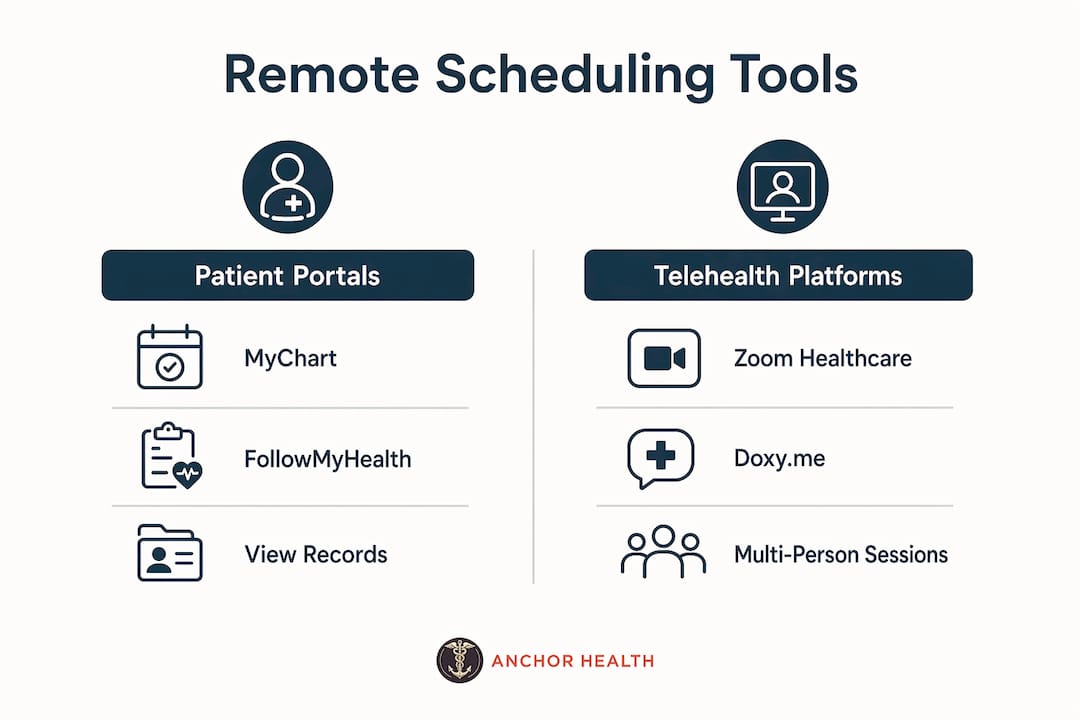
Patient portals are the most important starting point. MyChart proxy access lets one family member manage appointments and records for multiple relatives from a single login. This is especially useful for parents managing pediatric care alongside elderly parent care at the same time.
Telehealth platforms like Zoom for Healthcare and Doxy.me are HIPAA-compliant and support multi-person sessions, meaning a family member in another state can join a visit in real time, ask questions, and take notes alongside the patient. This changes the dynamic of remote caregiving significantly.
Caregiver apps like CircleCare replace fragmented group texts with a shared dashboard that shows who is responsible for each appointment, tracks medications, and sends real-time updates to everyone in the care circle. The practical benefit is that no one has to ask “did Mom take her medication?” or “who is taking Dad to his follow-up?” because the answer is visible to everyone.
Online scheduling platforms that integrate with practice management systems allow booking in under three minutes, with real-time provider availability and the ability to manage multiple providers from one interface. Many clinics also reserve slots specifically for urgent virtual visits, which matters when a child develops a fever on a Tuesday afternoon.
Practices that use integrated EHR and telehealth workflows reduce no-shows by automating scheduling, reminders, and charting in one system. For families, this means fewer missed appointments and less administrative back-and-forth. Understanding telehealth for kids specifically helps parents set up the right platforms before the first pediatric visit.
How can families coordinate remote and in-person appointments effectively?
Coordination is where most families lose efficiency. The tools exist, but without a clear process for who does what before, during, and after each appointment, information gets lost and follow-up falls through.
-
Designate a primary care coordinator. One family member should own the master schedule, hold proxy portal access, and serve as the main point of contact for providers. This prevents duplicate calls and conflicting information.
-
Send questions to the provider in advance. Contacting the nurse line or administrative staff at least 48 hours before an appointment to submit your questions improves the quality of the visit and ensures the provider is prepared. This is especially useful for complex cases with multiple concerns.
-
Join telehealth visits as a remote caregiver. Most providers support multi-person video sessions. If you cannot attend in person, ask the provider’s office to send a video link and confirm the platform they use. Knowing how to attend as a caregiver before the appointment day removes last-minute technical stress.
-
Use a shared notes document during the visit. One person takes notes in a shared Google Doc or Apple Notes file that all family members can access immediately after the appointment. Include the provider’s name, key findings, next steps, and any prescriptions or referrals.
-
Debrief within 24 hours. A short family call or group message after each appointment keeps everyone aligned on what was discussed, what was prescribed, and what the next appointment date is.
Pro Tip: Create a simple appointment template in Google Docs with fields for provider name, date, key findings, medications changed, and next steps. Share it with your care circle before the first visit so everyone knows where to look after each appointment.
For families coordinating care for aging parents, the role of family in home care extends beyond appointments to include daily check-ins and shared responsibility for follow-through on care plans.
What are the common challenges in remote appointment management?
Even well-organized families run into predictable obstacles. Knowing what they are makes them easier to solve before they become problems.
-
Time zone differences create scheduling conflicts when family members are spread across the country. The fix is to use a shared calendar that displays appointments in each person’s local time zone automatically. Google Calendar does this by default when events are created with the correct time zone attached.
-
Technical failures before telehealth visits are the most common source of missed appointments. Test your camera, microphone, and internet connection at least 30 minutes before every video visit. Confirm the platform link with the provider’s office the day before.
-
Fragmented communication across texts, emails, and phone calls causes critical information to get lost. A centralized medical binder, whether physical or digital, is the most reliable solution. It should contain current medications, insurance information, provider contacts, appointment history, and post-visit summaries updated after each visit.
-
Missed appointments are significantly reduced when automated reminders are active through the provider’s scheduling system. Confirm that your family member’s contact information is current in every patient portal so reminders reach the right person.
-
Accessing records across multiple providers without prior authorization causes delays during urgent situations. Submitting HIPAA forms in advance to every specialist on the care team prevents this entirely.
For families managing pediatric and adult care simultaneously, family primary care best practices by age group provide a useful framework for knowing which appointments to prioritize and how frequently each family member should be seen.
Key takeaways
Remote family health appointment management works when legal access, centralized tools, and clear coordination roles are established before a health need arises.
| Point | Details |
|---|---|
| Legal access comes first | Submit HIPAA authorization forms to every provider separately before you need urgent access. |
| Proxy portals save the most time | MyChart proxy access lets one person manage records and scheduling for multiple family members from one login. |
| Multi-person telehealth is standard | Platforms like Zoom for Healthcare and Doxy.me support family caregivers joining visits remotely in real time. |
| Centralized records prevent gaps | A digital or physical medical binder with medications, contacts, and visit summaries keeps all caregivers aligned. |
| Automation reduces no-shows | Integrated EHR systems with automated reminders significantly lower missed appointments for busy families. |
What I have learned from coordinating care across distance
The part no one tells you upfront is that the technology is the easy part. The harder part is getting every provider’s office to actually process your HIPAA forms and activate proxy access before you need it. I have seen families spend hours on the phone during a health crisis because they assumed one form covered everything. It does not.
The single most useful habit I have observed is treating the medical binder as a living document, not a one-time setup. Families who update it after every appointment, including what was prescribed, what was discussed, and what the next visit date is, have dramatically fewer coordination failures than those who rely on memory or scattered texts.
Shared calendars are underused. Most families default to group texts, which bury appointment details under unrelated messages within hours. A shared Google Calendar with appointment details, provider names, and video links in the event notes takes two minutes to set up and saves hours of confusion over months of care.
The other insight worth naming: telehealth providers who offer continuity with a single consistent provider make remote management significantly easier. When your family sees the same physician across visits, that provider already knows the history, which means less time re-explaining and more time addressing what actually matters. That continuity is what makes the difference between reactive care and care that actually stays ahead of problems.
— Paule
How Myanchorhealthpc supports your family’s remote care
Myanchorhealthpc is a Maryland-based telehealth primary care provider built around the Anchored Care℠ model, which prioritizes continuity, relationship-based care, and thorough visits over rushed, episodic treatment. For families managing care across distance or busy schedules, that consistency matters. Every visit happens via secure video, and the practice serves all ages, from pediatric and adolescent care to women’s health and chronic condition management. If you are deciding where to start, the guide on choosing telehealth primary care for your family walks through exactly what to look for in a provider. Families who need support setting up pediatric telehealth care will find clear, practical guidance there as well.
FAQ
What is proxy access in a patient portal?
Proxy access allows a designated family member to log into a patient portal, such as MyChart, and manage appointments, view records, and message providers on behalf of another person. Setup requires submitting a signed authorization form to the provider’s office, which typically takes about 15 minutes to complete.
How do I join a family member’s telehealth appointment remotely?
Contact the provider’s office at least 48 hours in advance to request a video link and confirm the platform being used. Most providers support multi-person sessions through HIPAA-compliant platforms like Zoom for Healthcare or Doxy.me.
Do I need a separate HIPAA form for each doctor?
Yes. HIPAA authorization must be submitted individually to each provider’s office. A single form does not grant access across multiple specialists or facilities, so submitting forms in a batch session for all providers at once is the most efficient approach.
What is the best way to track appointments for multiple family members?
A shared digital calendar, such as Google Calendar or Apple Calendar, combined with a centralized medical binder or caregiver app like CircleCare, gives all family members real-time visibility into upcoming appointments, medications, and follow-up tasks.
Can telehealth replace in-person visits for ongoing family care?
Telehealth covers a wide range of primary care needs, including chronic condition management, mental health support, pediatric visits, and medication management, without requiring in-person attendance. Some situations, such as physical exams or diagnostic procedures, still require an in-person visit, so a hybrid approach works best for most families.
Recommended
- How to Choose Telehealth Primary Care for Your Family
- How to Attend a Telehealth Visit as a Caregiver
- Family Primary Care Best Practices for Every Age
- How to Establish Pediatric Care Telehealth for Your Family
Blog & Information Disclaimer
Last Updated: May 23, 2026
The information provided on the Anchor Health website (https://myanchorhealthpc.com/), including but not limited to blog posts, articles, newsletters, graphics, and other materials (collectively, the "Content"), is for general informational and educational purposes only.
By accessing and using this website, you acknowledge and agree to the following terms and conditions:
The Content on this website is not intended to be a substitute for professional medical advice, diagnosis, or treatment. Always seek the advice of your physician, nurse practitioner, or other qualified health provider with any questions you may have regarding a medical condition. Never disregard professional medical advice or delay in seeking it because of something you have read on this website.
Reading, interacting with, or sharing the Content on this website does not establish a patient-provider relationship between you and Anchor Health or any of its clinicians, including Paule Valery Joseph, PhD, MBA, CRNP, FAAN. A formal patient-provider relationship is only established after you have completed the formal intake process, signed our clinical consent forms, and participated in a secure clinical consultation.
If you are experiencing a medical emergency, call 911 or seek emergency medical services immediately.
Anchor Health is a primary care practice and does not provide emergency or crisis intervention services through its website or blog.
While Anchor Health strives to provide thoughtful, evidence-based information grounded in our Anchored Care℠ model, healthcare is a rapidly evolving field. We make no representations or warranties, express or implied, about the completeness, accuracy, reliability, or suitability of the information contained in the Content. Any reliance you place on such information is strictly at your own risk.
Anchor Health is a telehealth practice providing services to patients physically located within the state of Maryland. The information provided on this blog is intended for residents of Maryland and is governed by the laws and regulations of that state. Accessing this information from outside of Maryland does not imply that our clinicians are licensed to practice medicine or provide consultations in your jurisdiction.
Content related to Weight & Metabolic Health, including discussions of GLP-1 medications or other medical therapies, is provided for educational context regarding our clinical approach. Prescriptions and specific medical recommendations are only made following a comprehensive clinical evaluation, diagnostic testing, and shared decision-making within a formal patient-provider relationship.
This website may contain links to external websites that are not provided or maintained by or in any way affiliated with Anchor Health. Please note that Anchor Health does not guarantee the accuracy, relevance, timeliness, or completeness of any information on these external websites.
To the fullest extent permitted by law, Anchor Health, its owners, and its employees shall not be liable for any direct, indirect, incidental, consequential, or punitive damag
Related posts