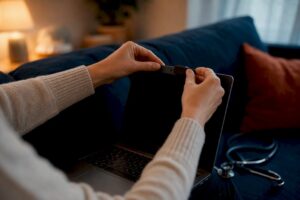
How to Share Blood Pressure Readings With Your Telehealth Doctor

To share blood pressure readings with your telehealth doctor, measure with a clinically validated upper-arm cuff, record two to three readings taken one minute apart, and send them through your clinic’s secure patient portal as a PDF export or app-generated trend report. That single workflow covers what most telehealth clinicians need to make a confident treatment decision.
Immediate steps before your next visit:
- Sit quietly for five minutes before measuring.
- Place the cuff on your bare upper arm, at heart level.
- Take two readings one minute apart; record both.
- Log the date, time, systolic, diastolic, and heart rate for each reading.
- Export a PDF or trend report from your monitor’s app, or copy readings into a simple table and upload it through your patient portal.
- If your portal allows secure messaging, paste a brief summary noting any symptoms or recent medication changes.
Pro Tip: If your portal has a file-upload feature, attach the PDF trend report rather than typing readings into a message box. Clinicians can scan a formatted report in seconds; a string of numbers in a chat message takes much longer to interpret.
If your systolic reading is 180 or higher, or your diastolic is 120 or higher, do not wait for a telehealth appointment. Call your clinician immediately or go to the nearest emergency room, especially if you have chest pain, shortness of breath, severe headache, or sudden vision changes. These readings may indicate a hypertensive crisis.
Key Takeaways
Sharing blood pressure readings with your telehealth doctor requires a validated upper-arm cuff, a consistent measurement protocol, and a secure, formatted submission through your patient portal before every visit.
Table of Contents
- Why do home blood pressure readings matter for telehealth visits?
- How to measure your blood pressure at home the way clinicians expect
- Practical ways to record and share readings with your telehealth doctor
- What does your telehealth doctor actually need to make treatment decisions?
- How to choose a blood pressure monitor for telehealth
- Privacy and safety when sharing blood pressure readings remotely
- Pre-visit checklist and a copyable blood pressure log you can send
- How clinicians actually prefer to receive home BP data
- A telehealth practice’s perspective on home blood pressure data
- Managing hypertension remotely with Myanchorhealthpc
- Sources
Why do home blood pressure readings matter for telehealth visits?
A single reading taken in a clinic exam room tells your clinician very little. Anxiety, a rushed commute, or even the act of sitting in a waiting room can push blood pressure up by 10–20 mmHg, a well-documented phenomenon called white-coat hypertension. On the other side, masked hypertension, where readings appear normal in the office but run high at home, affects a meaningful share of patients and often goes undetected without home data.
Home monitoring provides a more accurate picture of daily blood pressure and helps distinguish true hypertension from office-only elevation. For telehealth visits, where no in-person measurement is possible, that distinction becomes the entire clinical foundation.
Peer-reviewed evidence supports integrating home blood pressure monitoring with telemedicine for effective hypertension management. Clinicians who receive reliable home data can make medication decisions with the same confidence as those seeing patients in person, and in some settings, telehealth achieves comparable blood pressure control to clinic visits when home monitoring is part of the workflow.
CDC data on high blood pressure underscore why reliable monitoring matters at the population level: hypertension is one of the most common and least controlled chronic conditions in the United States. Trends over multiple days, not a single snapshot, are what allow your clinician to decide whether to start, adjust, or hold a medication. Timestamps and context notes (what you were doing, whether you had coffee, whether you felt stressed) make those trends far more useful.
The AMA has emphasized that telehealth visits should incorporate blood pressure measurement rather than skip it, and PMC-published research confirms that home monitoring integrated with telemedicine supports effective hypertension management. The practical implication: your readings are not a formality. They are the clinical data your doctor is working from.
How to measure your blood pressure at home the way clinicians expect
Use a clinically validated upper-arm cuff and follow this sequence every time. Consistency in technique matters as much as the device itself.
- Avoid triggers for 30 minutes before measuring. No caffeine, exercise, tobacco, or large meals.
- Sit quietly for five minutes. Sit in a chair with back support, feet flat on the floor, legs uncrossed.
- Position your arm correctly. Rest your bare upper arm on a flat surface so the cuff sits at heart level.
- Apply the cuff snugly. The bottom edge should sit about one inch above the bend of your elbow. Slide two fingers under the cuff to confirm it is not too tight.
- Stay still and silent. Do not talk or look at your phone during the measurement.
- Take a second reading one minute after the first. Record both values.
- Note the time, date, and any relevant context (woke up, felt anxious, took medication late).
When to measure: A commonly used protocol is two readings in the morning before medication and two in the evening over multiple consecutive days. An alternate approach, useful for a shorter monitoring window, is 12 readings taken over three days. Harvard Health guidance and PMC-reviewed protocols both support repeated measurements across multiple days as the accepted standard before making long-term medication decisions.
Avoid wrist cuffs unless your clinician has specifically recommended one. Wrist monitors are more sensitive to positioning errors and tend to produce less consistent readings than upper-arm devices.
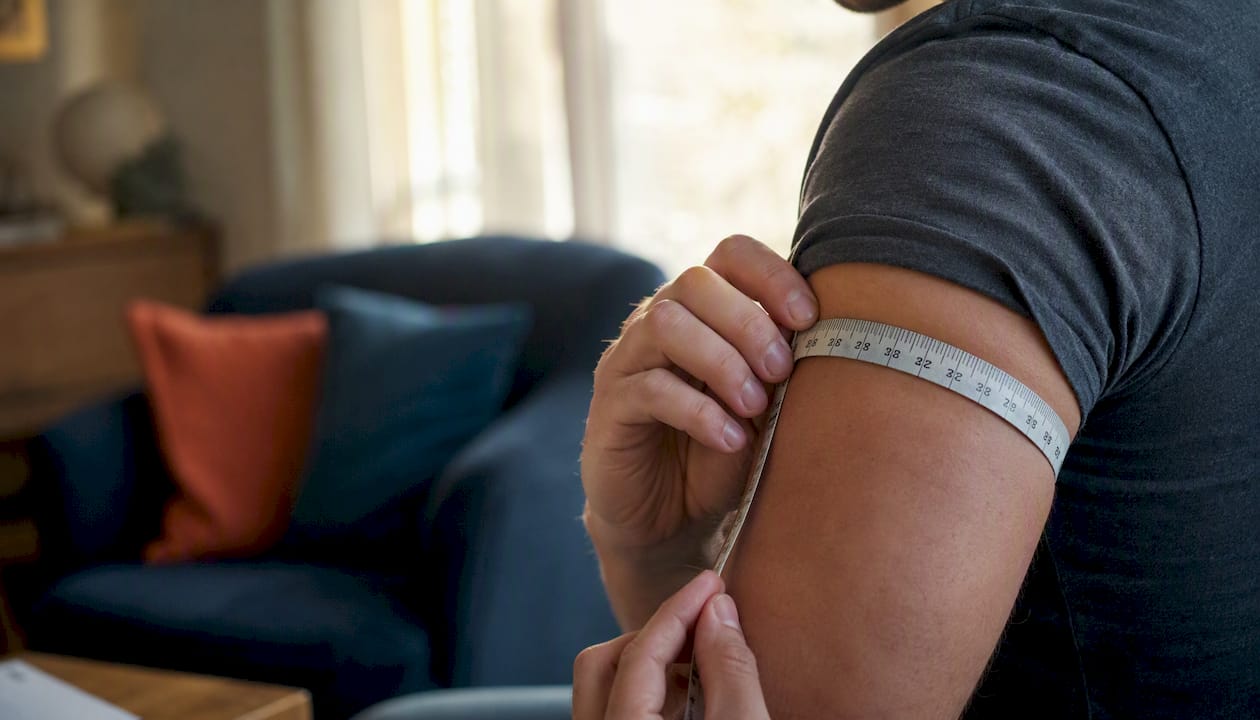
Pro Tip: Cuff size is one of the most overlooked accuracy factors. A cuff that is too small will read artificially high; one that is too large will read low. Measure the circumference of your upper arm and match it to the cuff’s labeled size range before you buy or use a monitor.
Practical ways to record and share readings with your telehealth doctor
The method you use to send readings affects how quickly your clinician can act on them. Preferred options are those that deliver a complete, timestamped record directly into your care team’s workflow.
Preferred methods:
- Secure patient portal upload (PDF or trend report). Most telehealth platforms include a portal where you can upload files or send secure messages. Export a PDF trend report from your monitor’s companion app and attach it. This is the fastest path to clinical review.
- Cellular-enabled monitor with automatic transmission. Some remote patient monitoring programs ship pre-activated cellular cuffs that send readings directly to a clinical portal or electronic health record with no app pairing or Wi-Fi required. This removes the most common technical barriers and tends to improve long-term adherence.
- Bluetooth-synced app export. Monitors that pair with a smartphone app (syncing to Apple Health or Google Fit) can generate PDF reports or trend charts. Export the report from the app and upload it to your portal, or share it through the portal’s secure messaging feature.
Acceptable alternatives:
- Manual log as a typed table. If your device has no export function, type your readings into a simple table (see the template in a later section) and paste it into a secure portal message or attach it as a document.
- Screenshot of your monitor’s memory screen. Acceptable when no other option exists, but less useful because it shows raw numbers without trend context or timestamps in a readable format.
Last resort only:
- Standard SMS or unsecured email. Avoid these for transmitting blood pressure data. They are not HIPAA-compliant and put your personal health information at risk.
Apps that integrate with Apple Health and Google Fit can generate exportable trend charts that many clinicians accept. Cellular-enabled remote monitoring solutions go further by delivering readings directly into clinical portals, reducing the steps you need to manage yourself.
Pro Tip: Before your first telehealth visit, ask your clinician’s office which format they prefer. Some practices have a specific portal upload workflow; others prefer a PDF attached to a secure message. Knowing in advance saves a round of back-and-forth.
What does your telehealth doctor actually need to make treatment decisions?
Clinicians want multiple readings over time, clear timestamps, and enough context to distinguish a true pattern from a one-off spike. A single reading, even an alarming one, rarely justifies a medication change on its own.
Recommended monitoring schedule:
Red flags that require immediate contact with your clinician or emergency care:
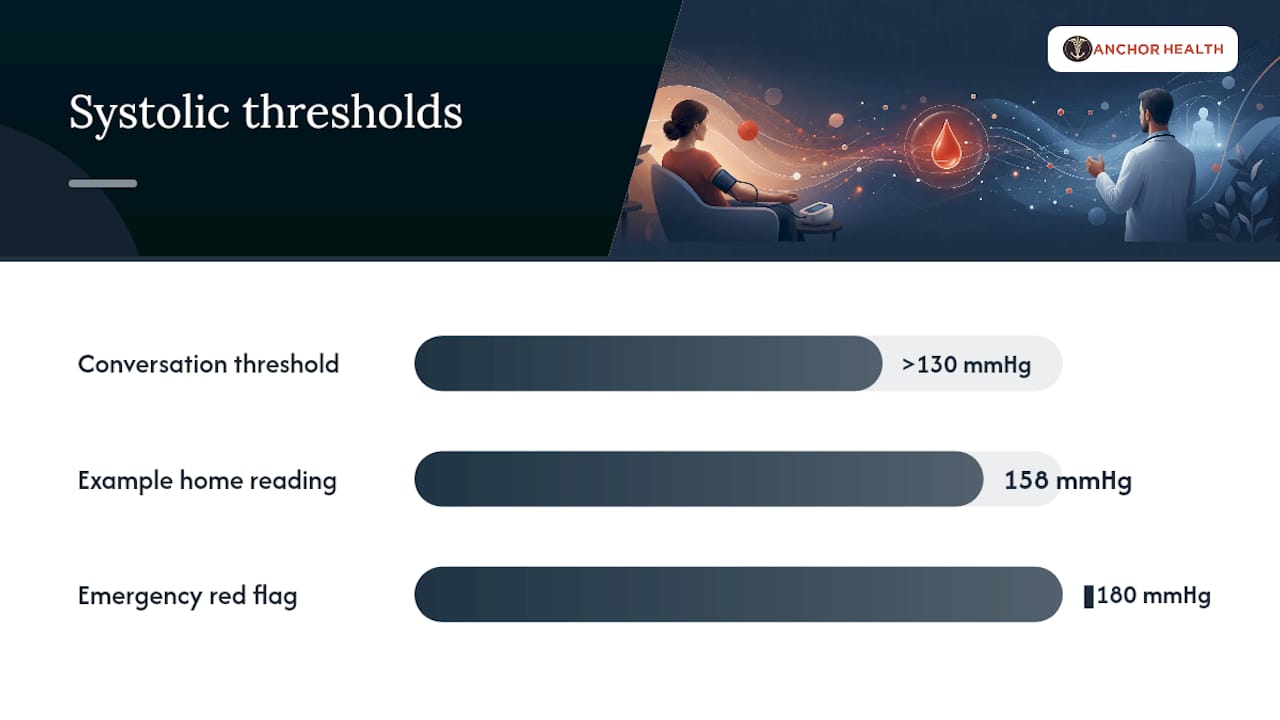
- Systolic reading at or above 180 mmHg
- Diastolic reading at or above 120 mmHg
- Any elevated reading accompanied by chest pain, shortness of breath, sudden severe headache, or vision changes
- Readings consistently above your established target range, even without symptoms
Cleveland Clinic clinical guidance provides clear thresholds for hypertension stages and when clinical intervention is warranted. Most clinicians set individualized targets, but a systolic consistently above 130 mmHg or a diastolic above 80 mmHg typically warrants a conversation.
Trend context speeds every decision. A reading of 158/94 mmHg at 7:00 AM after a poor night’s sleep means something different from the same number appearing consistently across 14 morning readings. Timestamps and brief notes transform raw numbers into a clinical story.
Including your current medication list and any recent dose changes alongside your readings gives your clinician the full picture without requiring a separate message.
How to choose a blood pressure monitor for telehealth
The right device for telehealth monitoring is an upper-arm cuff that has been validated for clinical accuracy and offers some form of data export. Finger monitors are not appropriate for this purpose.
Must-have features:
- Upper-arm placement (not wrist or finger)
- Clinical validation statement from the manufacturer (look for validation against recognized standards such as those from the American Medical Association or the European Society of Hypertension)
- Correct cuff size for your arm circumference
- Memory storage for at least 30 readings
Useful additions:
- Bluetooth connectivity to a companion smartphone app with PDF export
- Apple Health or Google Fit integration
- Irregular heartbeat detection
Worth the extra cost for long-term monitoring:
- Cellular-enabled transmission (no app pairing, no Wi-Fi, readings go directly to your care team)
Monitors typically range from about $25 to $100, with advanced Bluetooth and cellular models at the higher end. For someone managing hypertension over months or years, the time saved by automatic data transmission often justifies the price difference.
To verify a device’s validation status, check the manufacturer’s product page for language referencing clinical validation studies, or ask your clinician whether they have a preferred device list for their remote patient monitoring program.
Pro Tip: If your clinician’s practice uses a remote patient monitoring program, ask whether they can supply a pre-activated cellular cuff. Many programs provide the device at no cost to the patient, and the readings flow directly into the EHR without any action on your part.
Privacy and safety when sharing blood pressure readings remotely
Blood pressure readings are protected health information (PHI). How you transmit them matters.
Do:
- Use your clinic’s secure patient portal for all uploads and messages.
- Confirm you are sending to the correct provider before submitting.
- Review the permissions of any third-party app (such as a BP monitor companion app) before granting access to your health data.
- Use a private, password-protected Wi-Fi network when uploading readings or syncing your device.
Don’t:
- Send readings via standard SMS text message or a personal email account.
- Upload health data over public Wi-Fi (coffee shops, airports, hotel networks).
- Share portal login credentials with anyone, including family members who may be helping you manage care.
- Screenshot readings and post them in unencrypted messaging apps.
Secure patient portals and EHR-integrated uploads meet HIPAA standards for transmitting health data. If you are unsure whether your monitor’s app stores data securely, ask your clinician which apps or export methods their practice accepts. Keep your phone and monitor credentials protected with a PIN or biometric lock, since the device itself holds a record of your readings.
Pre-visit checklist and a copyable blood pressure log you can send
Arriving at a telehealth visit with a short, dated table of readings and a brief summary message is the most efficient way to prepare your clinician. Here is a ready-to-use template.
Sample blood pressure log:
Copy this table into a document, fill in your own readings, and either attach it as a PDF or paste it into a secure portal message.
Pre-visit checklist:
- Charge your monitor the night before.
- Take your morning readings before your appointment and add them to the log.
- Prepare a brief portal message (see template below).
- Have your current medication list ready, including dosages and any recent changes.
- Note any symptoms you have experienced since your last visit.
Sample portal message you can adapt:
“Hi, I am attaching my blood pressure log from the past [X] days. My readings have been running around [average systolic]/[average diastolic] in the mornings. I [have/have not] made any changes to my medications. I have noticed [describe any symptoms, or write ‘no new symptoms’]. Please let me know if you need anything else before our visit.”
For guidance on crafting clear messages to your care team, see how to communicate care needs to your telehealth provider.
How clinicians actually prefer to receive home BP data
The format of your submission affects how quickly a clinician can act. A consolidated PDF trend report with timestamps is the most useful format across virtually every practice setting. A string of numbers copied into a chat message requires manual interpretation; a well-formatted report with a trend chart allows a clinician to assess control at a glance.
Professional guidance from the AMA and peer-reviewed literature consistently supports incorporating home BP data into telehealth workflows. Clinicians who receive structured, timestamped reports can make medication decisions with the same confidence as those seeing patients in person, and the PMC evidence base for home monitoring integrated with telemedicine continues to grow.
What to include with every submission:
- A dated log or exported trend report covering at least three days of readings.
- Your current medication list with dosages.
- Any recent dose changes and the date they occurred.
- A brief symptom summary (even “no new symptoms” is useful).
- Notes on unusual readings (poor sleep, illness, high stress, missed dose).
A screenshot of your monitor’s screen is better than nothing, but it shows only the most recent reading with no trend context. Clinicians managing chronic disease through telehealth rely on patterns, not single data points, to make confident decisions. The extra two minutes it takes to export a PDF report can meaningfully shorten the time between your submission and a clinical response.
Setting clear health goals with your telehealth provider at the start of your monitoring period also helps, since it gives both you and your clinician a shared target to measure progress against.
A telehealth practice’s perspective on home blood pressure data
We review home blood pressure data before every hypertension-related visit. When a patient sends a well-organized trend report, the visit itself becomes more productive. We can spend the time discussing what the numbers mean, whether a medication adjustment makes sense, and what to watch for over the next monitoring period, rather than reconstructing a fragmented picture from memory or a few typed numbers.
A typical workflow at a practice like ours looks like this: a patient submits a seven-day log through the portal two to three days before their scheduled video visit. The clinician reviews the trend, flags any readings above threshold, and comes to the visit with a clear question: is this pattern consistent with good control, or does it suggest a change is needed? That preparation compresses a 30-minute visit into a focused, efficient conversation.
What we see less often, but find most useful, is the context note. A reading of 162/98 mmHg means very little without knowing it followed a sleepless night and a missed morning dose. That single line of context can be the difference between an unnecessary medication increase and a reassuring follow-up plan.
Patients who set clear monitoring goals with their provider at the outset tend to submit more consistent data and have more productive visits. The relationship between patient and clinician in a telehealth model depends on that data pipeline. When it works well, remote care for hypertension is not a compromise. It is a genuinely better fit for many patients.
Managing hypertension remotely with Myanchorhealthpc
Consistent blood pressure management requires a clinician who actually reviews your data and follows up, not one who glances at a number once a year.
Myanchorhealthpc is a Maryland-based telehealth primary care practice built around exactly this kind of continuity. Through secure video visits, our team reviews your home BP trends, discusses medication adjustments, and coordinates follow-up, all without requiring you to take time off work or sit in a waiting room. We accept insurance, self-pay, HSA/FSA funds, and offer an optional membership for patients who want more frequent access and structured follow-up. If you are managing hypertension and want a consistent provider who integrates your home monitoring data into every visit, choosing the right telehealth primary care starts with a practice that treats your readings as the clinical foundation they are. Book a visit with Myanchorhealthpc to get started.
Sources
- Monitoring blood pressure at home? Make sure you follow these steps – Harvard Health
- Home blood pressure and telemedicine: A modern approach for managing hypertension during and after COVID-19 pandemic – PMC
- High blood pressure facts & statistics – CDC
- Why telehealth visits shouldn’t mean skipping BP measurement – AMA
- Telehealth may be just as good as clinic visits for treating high blood pressure – AHA
This article provides general health information and is not a substitute for professional medical advice. Always confirm current clinical guidance and treatment decisions with your licensed healthcare provider.
Recommended
- How to Manage Diabetes Care Through Telehealth
- How to Request Lab Work Through Telehealth
- How to Communicate Care Needs to Your Telehealth Provider
- Chronic Disease Telehealth Management Tips That Work
Blog & Information Disclaimer
Last Updated: May 23, 2026
The information provided on the Anchor Health website (https://myanchorhealthpc.com/), including but not limited to blog posts, articles, newsletters, graphics, and other materials (collectively, the "Content"), is for general informational and educational purposes only.
By accessing and using this website, you acknowledge and agree to the following terms and conditions:
The Content on this website is not intended to be a substitute for professional medical advice, diagnosis, or treatment. Always seek the advice of your physician, nurse practitioner, or other qualified health provider with any questions you may have regarding a medical condition. Never disregard professional medical advice or delay in seeking it because of something you have read on this website.
Reading, interacting with, or sharing the Content on this website does not establish a patient-provider relationship between you and Anchor Health or any of its clinicians, including Paule Valery Joseph, PhD, MBA, CRNP, FAAN. A formal patient-provider relationship is only established after you have completed the formal intake process, signed our clinical consent forms, and participated in a secure clinical consultation.
If you are experiencing a medical emergency, call 911 or seek emergency medical services immediately.
Anchor Health is a primary care practice and does not provide emergency or crisis intervention services through its website or blog.
While Anchor Health strives to provide thoughtful, evidence-based information grounded in our Anchored Care℠ model, healthcare is a rapidly evolving field. We make no representations or warranties, express or implied, about the completeness, accuracy, reliability, or suitability of the information contained in the Content. Any reliance you place on such information is strictly at your own risk.
Anchor Health is a telehealth practice providing services to patients physically located within the state of Maryland. The information provided on this blog is intended for residents of Maryland and is governed by the laws and regulations of that state. Accessing this information from outside of Maryland does not imply that our clinicians are licensed to practice medicine or provide consultations in your jurisdiction.
Content related to Weight & Metabolic Health, including discussions of GLP-1 medications or other medical therapies, is provided for educational context regarding our clinical approach. Prescriptions and specific medical recommendations are only made following a comprehensive clinical evaluation, diagnostic testing, and shared decision-making within a formal patient-provider relationship.
This website may contain links to external websites that are not provided or maintained by or in any way affiliated with Anchor Health. Please note that Anchor Health does not guarantee the accuracy, relevance, timeliness, or completeness of any information on these external websites.
To the fullest extent permitted by law, Anchor Health, its owners, and its employees shall not be liable for any direct, indirect, incidental, consequential, or punitive damag
Related posts