Patient Portal Access for Caregivers: What It Means

Patient portal access for a caregiver means an authorized, trackable login — a proxy or delegate account — that lets a trusted person perform specific care tasks on a patient’s behalf while keeping clinicians clearly informed about who is acting. This is the standard the ONC/HHS Patient Engagement Playbook recommends, and it is meaningfully different from simply borrowing a patient’s username and password.
With proper proxy access, you can typically:
- Send and receive secure messages with the care team
- View lab and imaging results, visit summaries, and medication lists
- Request prescription refills and schedule or change appointments
- Access billing statements and after-visit instructions
Two limits matter from the start. First, portal access is not the same as legal healthcare proxy or medical power of attorney — it does not grant decision-making authority. Second, access levels vary by health system, EHR platform, and state privacy law. The portals caregivers most often encounter in the U.S. are Epic MyChart, Cerner (Oracle Health), Athenahealth, and FollowMyHealth — each labels its proxy features differently, but the underlying concept is the same.
Table of Contents
- What “proxy access” actually means for caregivers
- What you can and often cannot do through a portal
- How permission levels are typically structured
- How to request and set up portal access in the U.S.
- Legal and privacy considerations every caregiver should know
- Research-backed benefits of shared portal access
- Common problems caregivers face and how to fix them
- Practical security and communication tips for caregivers
- Key Takeaways
- Why caregiver portal access deserves more attention than it gets
- Myanchorhealthpc makes caregiver portal access part of your care plan
- Authoritative sources and where to learn more
What “proxy access” actually means for caregivers
A patient portal is a secure online site linked directly to a patient’s electronic health record (EHR). Through it, patients can view their own records, message their care team, and manage appointments. Most major portals are built on EHR platforms from Epic, Cerner/Oracle Health, Athenahealth, or FollowMyHealth.

Proxy access (also called delegate or shared access) gives you, the caregiver, your own separate login that the patient authorizes. Clinicians see messages and actions attributed to you by name and role, not to the patient. That visibility matters: it protects the patient’s privacy, creates a clear audit trail, and prevents confusion about who is communicating.
The key distinctions:
- Patient credentials: Logging in as the patient. Discouraged because it hides your identity, damages audit trails, and creates security risk.
- Formal proxy/delegate account: Your own login, authorized by the patient or their legal representative. Recommended by the Coalition for Care Partners and federal guidance.
- Care partner vs. proxy: Some portals use “care partner” or “authorized representative” — these are functionally the same concept, just branded differently by each vendor.
Getting the terminology right helps when you call a clinic to request access. Ask specifically for “shared access,” “proxy registration,” or “delegate account” — whichever term the portal uses.
What you can and often cannot do through a portal
Proxy access lets caregivers perform essential tasks while making your identity visible to the care team. In practice, most portals allow:
- Secure messaging with physicians, nurses, and care coordinators
- Viewing test results — labs, imaging reports, pathology — often the same day they are released
- Downloading visit summaries and after-visit care instructions
- Requesting prescription refills for ongoing medications
- Scheduling, rescheduling, or canceling appointments
- Viewing immunization records and current medication lists
- Accessing billing statements and explanation-of-benefits documents
What portals typically do not allow through proxy access: signing legally binding consent forms, making formal medical decisions, or viewing certain sensitive notes (mental health, substance use, reproductive health) unless the patient explicitly grants that visibility.
Pro Tip: When you send a message from your proxy account, the clinician sees your name and role — not the patient’s. That clarity prevents accidental disclosures and keeps the care team informed about who is coordinating care. Always identify yourself briefly in your first message: “This is [Name], [Relationship]’s daughter and primary caregiver.”

A practical example: if your parent is discharged from the hospital on a Friday afternoon, you can log into the portal that evening, pull the discharge summary, check the new medication list, and send a clarifying message to the primary care team — all without waiting for Monday’s office hours. That kind of same-day access is one of the most concrete benefits of patient portal use for caregivers.
How permission levels are typically structured
Not all proxy accounts are equal. Health systems configure access in layers, and the patient usually controls which layers you receive.
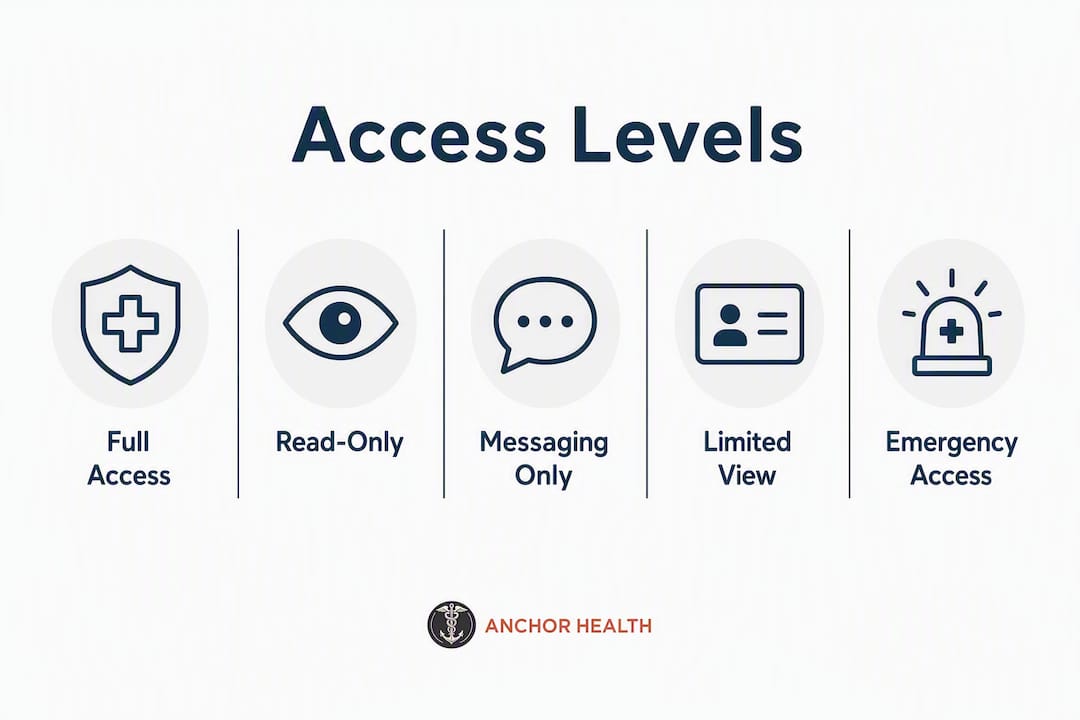
| Permission Level | What It Includes | Typical Use Case |
|---|---|---|
| Read-only | View records, results, visit notes | Adult child monitoring an aging parent’s labs |
| Messaging-enabled | Two-way secure messaging with care team | Primary caregiver coordinating daily care questions |
| Scheduling/refills | Book appointments, request prescription renewals | Spouse managing logistics for a partner with dementia |
| Billing access | View statements, pay balances | Family member handling finances for an ill relative |
| Full delegate access | All of the above combined | Legal guardian or healthcare proxy for a dependent adult |
Some EHRs, including Epic MyChart and Cerner/Oracle Health, allow patients to configure granular permissions — for example, granting messaging and scheduling but not billing visibility. Others offer a simpler all-or-nothing model. Athenahealth and FollowMyHealth implementations vary by practice, since individual clinics set the final rules within whatever their EHR platform allows.
A useful scenario: an older adult with moderate dementia might grant a spouse full delegate access covering messaging, medications, and scheduling. A younger adult recovering from surgery might authorize a parent only for appointment management, keeping lab results and clinical notes private. Both are valid — the patient’s preferences drive the configuration.
How to request and set up portal access in the U.S.
Start this process before you need it urgently. Enrollment can take days to weeks, and proxy registration commonly requires patient authorization, identity verification, and sometimes in-person steps.
Step-by-step enrollment:
- Talk with the patient about what they want to share and confirm they consent to proxy access.
- Contact the clinic or portal support line and ask specifically about “shared access” or “proxy registration.”
- Complete the required authorization form — available online through some portals, in-person only at others.
- Provide identity verification: a government-issued ID and documentation of your relationship (or power of attorney if the health system requires it).
- Wait for the clinic to activate your proxy login — you will receive a separate invitation or credentials.
- Log in with your unique proxy account and test each permission (messaging, scheduling, results) to confirm everything is active.
Verification checklist before you start:
- Signed patient authorization (electronic or paper)
- Your government-issued photo ID
- Proof of relationship (if required by the health system)
- Power of attorney or legal guardianship documents (if the patient cannot authorize independently)
- Contact information for portal technical support
Some systems, including those using Epic MyChart, allow the entire process online. Others require an in-person visit or a staff-assisted enrollment call. Document the date you submitted your request and keep copies of all authorization forms. If you are managing family health appointments remotely, having that paper trail prevents delays when access needs to be renewed or updated.
Legal and privacy considerations every caregiver should know
HIPAA permits healthcare providers to share information with family members or friends involved in a patient’s care, unless the patient objects. But state laws and individual health system policies create important variations that HIPAA alone does not resolve.
Portal access is not a substitute for legal authority. Having a proxy login does not make you a healthcare proxy or grant medical power of attorney. Those are separate legal instruments. If you may need to make medical decisions for someone, confirm that authority through appropriate legal channels and inform the care team directly. A portal account and a healthcare proxy designation can coexist — but one does not create the other.
Adolescents and minors: State laws in many U.S. states give minors the right to control access to specific services — sexual and reproductive health, mental health treatment, and substance use care are the most common. When a minor has that legal control, a parent’s portal access may be automatically limited for those categories, even if the parent has full proxy access otherwise. This is not a system error; it reflects the law. For pediatric caregivers navigating complex medical needs, understanding these state-specific limits early prevents frustration later.
Emergency access: In a genuine emergency, clinicians may share information with family members present without prior proxy registration. Routine access, however, should always be authorized in advance. Relying on emergency exceptions for everyday caregiving creates gaps in the audit trail and puts both the patient and the caregiver in an unclear position.
This article provides general information, not legal or medical advice. Confirm current rules with your state’s health authority or a qualified legal professional.
Research-backed benefits of shared portal access
The evidence for proxy access is real, though uptake remains lower than it should be. A nationally representative study of older adults found that 14% had caregivers as their sole portal users, while 74% reported no portal use at all in the prior year. That gap represents a significant missed opportunity for care coordination.
Key findings from peer-reviewed and federal sources:
- Proxy access improves care transitions after hospital discharge by making caregiver identity and actions visible to the clinical team, reducing the risk of medication errors and missed follow-ups.
- Caregivers and patients report time savings and better coordination as the most tangible benefits of portal use, particularly for messaging and medication management.
- A multi-site demonstration with the Coalition for Care Partners showed that shared access clarifies caregiver identity in the EHR and supports safer communication, though varied registration processes limited uptake.
- Portal use tends to concentrate around a single primary caregiver for higher-need patients, which means clinicians can use portal engagement as a signal to identify caregivers who may need additional support themselves.
The primary barrier is not technology. The ONC/HHS Playbook identifies awareness gaps and cumbersome enrollment workflows as the main reasons shared access remains underused. Knowing the process exists is the first step toward using it. For caregivers who also want to understand the broader telehealth benefits available to them, portal access is one piece of a larger picture.
Common problems caregivers face and how to fix them
Enrollment delays and permission gaps are the two most frequent complaints. Most are solvable with the right steps.
Troubleshooting checklist:
- Proxy login not activated: Call portal support and confirm the authorization form was received and processed. Ask for a documented timeline.
- Missing permissions: Ask the clinic to verify the proxy designation in the EHR and confirm which access levels were granted. Request a correction in writing.
- Messages routed incorrectly: Confirm you are using your proxy login, not the patient’s credentials. Messages sent from the patient’s account will not show your identity.
- Technical login issues: Clear your browser cache, use the portal’s recommended browser (usually Chrome or Safari), or download the portal’s official mobile app.
- Enrollment rejected: Bring original authorization paperwork in person and ask to speak with the clinic’s patient access coordinator.
Pro Tip: Keep a single secure document listing each patient’s portal name, your proxy username, the permissions granted, and the date of authorization. If you are caregiving for more than one person, this record prevents confusion and speeds up troubleshooting calls with support staff.
For caregivers managing multiple patients, request separate proxy accounts for each individual. Never use one person’s login to access another’s records, even within the same family.
Practical security and communication tips for caregivers
Security and clear communication are the two areas where caregivers most often create unintentional problems.
Security:
- Use a unique, strong password for your proxy login — not one shared with any other account.
- Enable multi-factor authentication if the portal offers it.
- Never share your proxy credentials with other family members; each person who needs access should request their own account.
- Update your password after any family transition (divorce, estrangement, change in caregiving arrangement).
Communication with the care team:
- Identify yourself by name and relationship in every message thread you initiate.
- Keep the care team informed when the primary caregiver changes.
- Request written confirmation when a clinician acts on a message you sent as a proxy.
Boundaries and access management:
- Respect the patient’s preferences about what information to share with other family members.
- Set clear expectations with relatives who ask you to share portal information — the patient’s consent governs what you can pass along.
- Review and revoke proxy access when it is no longer needed, such as after a patient recovers or a caregiving relationship ends.
For caregivers who are also navigating telehealth visits alongside portal use, these same communication principles apply in video appointments.
Key Takeaways
Formal proxy access, not borrowed patient credentials, is the safe and recommended standard for caregivers in the U.S.
| Point | Details |
|---|---|
| Use a formal proxy account | Request a dedicated caregiver login rather than using the patient’s credentials to protect privacy and audit trails. |
| Start enrollment early | Processing can take days to weeks; gather authorization forms and ID before an urgent need arises. |
| Confirm your exact permissions | Access levels vary by health system and EHR; verify messaging, scheduling, and results access after activation. |
| Portal access is not legal authority | A proxy login does not substitute for healthcare proxy or power of attorney; confirm legal decision-making authority separately. |
| Myanchorhealthpc supports caregiver enrollment | Myanchorhealthpc offers staff-assisted portal setup and telehealth visits to walk caregivers through access and permissions. |
Why caregiver portal access deserves more attention than it gets
Most of the conversation around patient portals focuses on patients. That framing misses something important: for a significant share of portal users, the person actually logging in is a caregiver. The nationally representative data showing 14% of older adults had caregivers as their sole portal users is not a footnote — it is a description of how care actually works for many families.
What concerns me most is the credential-sharing problem. Studies of seriously ill patients found that many proxy caregivers were logging in with the patient’s username and password rather than registering a separate account. That practice feels harmless in the moment, but it quietly undermines the entire purpose of a portal. Clinicians cannot tell who sent a message. Audit trails become unreliable. And if the patient’s account is ever compromised, the caregiver’s actions are invisible in the record.
The fix is not complicated. It requires clinics to proactively ask about caregivers at enrollment, make proxy registration a standard part of onboarding, and train staff to process those requests without friction. Caregivers, for their part, need to know the option exists — which is exactly why the awareness gap the ONC/HHS Playbook identifies matters so much. A caregiver who does not know proxy access is available will default to the patient’s login every time.
Myanchorhealthpc makes caregiver portal access part of your care plan
Caregivers managing a loved one’s health deserve a practice that treats them as part of the care team, not an afterthought. At Myanchorhealthpc, our Anchored Care℠ᴵᴾ model means we proactively identify care partners at enrollment, walk caregivers through proxy setup with staff assistance, and confirm permissions are working before the first telehealth visit.
We offer secure video visits across Maryland, accept insurance, and provide membership options for caregivers who want more structured follow-up and longer appointment times. Whether you are coordinating care for a parent, a child with complex needs, or a spouse managing a chronic condition, our team is ready to help you get the access and continuity you need. Start by choosing the right telehealth primary care plan for your family or visit our telehealth accessibility guide for caregivers to see how we support your role from day one.
Authoritative sources and where to learn more
These federal and peer-reviewed resources provide deeper detail on caregiver portal access, proxy enrollment, and privacy rules:
- Chapter 4, ONC/HHS Patient Engagement Playbook — Federal guidance on proxy/shared access workflows, enrollment best practices, and clinician recommendations for supporting caregivers.
- Use of the Provider-Sponsored Patient Portal among Older Adults and Their Family Caregivers (PMC) — Nationally representative data on portal use patterns among older adults and their caregivers.
- Characteristics of Patients and Proxy Caregivers Using Patient Portals in Serious Illness (PMC) — Research on proxy use in high-acuity settings and the risks of credential sharing.
- Coalition for Care Partners: Shared Access Toolkit — Practical toolkit for patients, caregivers, and clinics on setting up and managing shared access safely.
- Users’ Perspectives on a Demonstration to Increase Shared Access (Springer) — Multi-site study on implementation barriers and caregiver perspectives on proxy registration.
Policies vary by health system and state. Contact your clinic’s patient access coordinator for practice-specific enrollment steps and to confirm which permissions are available through your portal.
Recommended
- Common Caregiver Healthcare Access Barriers: 2026 Guide
- How to Attend a Telehealth Visit as a Caregiver
- Telehealth Accessibility for Caregivers: 2026 Guide
- Primary Care’s Role in Caregiver Preventive Screenings
Blog & Information Disclaimer
Last Updated: May 23, 2026
The information provided on the Anchor Health website (https://myanchorhealthpc.com/), including but not limited to blog posts, articles, newsletters, graphics, and other materials (collectively, the "Content"), is for general informational and educational purposes only.
By accessing and using this website, you acknowledge and agree to the following terms and conditions:
The Content on this website is not intended to be a substitute for professional medical advice, diagnosis, or treatment. Always seek the advice of your physician, nurse practitioner, or other qualified health provider with any questions you may have regarding a medical condition. Never disregard professional medical advice or delay in seeking it because of something you have read on this website.
Reading, interacting with, or sharing the Content on this website does not establish a patient-provider relationship between you and Anchor Health or any of its clinicians, including Paule Valery Joseph, PhD, MBA, CRNP, FAAN. A formal patient-provider relationship is only established after you have completed the formal intake process, signed our clinical consent forms, and participated in a secure clinical consultation.
If you are experiencing a medical emergency, call 911 or seek emergency medical services immediately.
Anchor Health is a primary care practice and does not provide emergency or crisis intervention services through its website or blog.
While Anchor Health strives to provide thoughtful, evidence-based information grounded in our Anchored Care℠ model, healthcare is a rapidly evolving field. We make no representations or warranties, express or implied, about the completeness, accuracy, reliability, or suitability of the information contained in the Content. Any reliance you place on such information is strictly at your own risk.
Anchor Health is a telehealth practice providing services to patients physically located within the state of Maryland. The information provided on this blog is intended for residents of Maryland and is governed by the laws and regulations of that state. Accessing this information from outside of Maryland does not imply that our clinicians are licensed to practice medicine or provide consultations in your jurisdiction.
Content related to Weight & Metabolic Health, including discussions of GLP-1 medications or other medical therapies, is provided for educational context regarding our clinical approach. Prescriptions and specific medical recommendations are only made following a comprehensive clinical evaluation, diagnostic testing, and shared decision-making within a formal patient-provider relationship.
This website may contain links to external websites that are not provided or maintained by or in any way affiliated with Anchor Health. Please note that Anchor Health does not guarantee the accuracy, relevance, timeliness, or completeness of any information on these external websites.
To the fullest extent permitted by law, Anchor Health, its owners, and its employees shall not be liable for any direct, indirect, incidental, consequential, or punitive damag
Related posts