Set Up Your First Telehealth Account: Maryland Guide

To set up your own telehealth account for the first time, create a secure patient portal account with your provider, complete identity verification, run a quick device test, and sign on 15 minutes early before your scheduled visit. Most primary-care telehealth visits take a short time, so arriving early gives you time to catch any technical issues without cutting into your appointment.
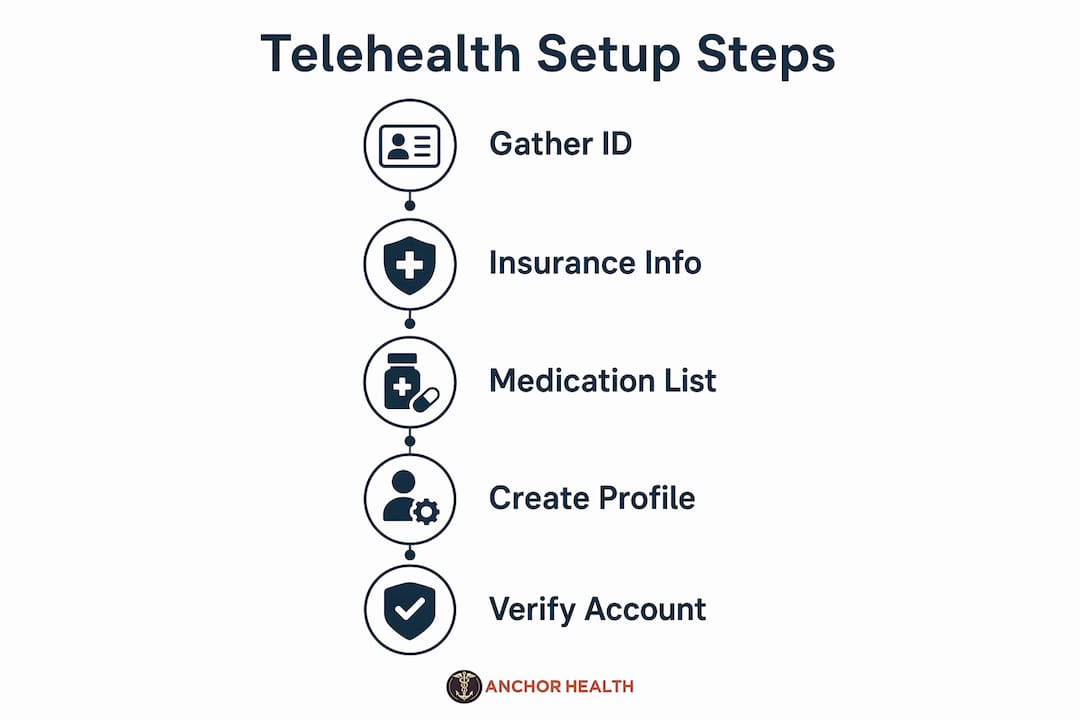
Before you start, gather these items:
- Government-issued photo ID
- Insurance card or payment method (HSA/FSA accepted at many practices)
- Email address and phone number for verification
- Current medications list or the actual bottles
- Preferred pharmacy name, address, or phone number
Pro Tip: If your video or audio fails during setup, check your browser’s camera and microphone permissions first. Camera and mic permissions must be granted manually the first time, and a black screen is almost always a permission issue, not a platform failure.
Once you have those items ready, the telehealth registration process can be completed quickly: create your profile, verify your email and phone, enter insurance or payment details, and complete a short medical intake form. Run a pre-visit readiness check a day or two before your appointment so you have time to contact support if anything needs fixing.

Table of Contents
How Myanchorhealthpc Supports First-Time Telehealth Patients in Maryland
Myanchorhealthpc is a Maryland telehealth primary care practice built around continuity, not convenience-only visits. Through its Anchored Care℠ᴵᴾ model, you get a consistent provider who knows your history, whether you’re managing a chronic condition, navigating a health transition, or bringing in a child for a pediatric visit.
Signing up takes five steps:
- Visit the Myanchorhealthpc patient portal and create your profile with your email and a secure password.
- Verify your email and phone number via the confirmation codes sent to each.
- Add your demographics, insurance information, or self-pay preference. HSA and FSA funds are accepted.
- Complete the brief medical intake: current medications, known conditions, allergies, and your preferred pharmacy contact.
- Book your first visit. Confirmation and reminder messages arrive by email.
Before your first visit, prepare your space and device:
- Place your device on a stable surface at eye level, facing away from any window behind you.
- Close other apps to free up bandwidth. If your home Wi-Fi is unstable, switch to a cellular connection or pause other household streaming during the call.
- Dress as you would for an in-person appointment, and have your medication bottles nearby.
- Have your pharmacy’s name and phone number ready. E-prescriptions are sent directly after the visit, and missing pharmacy details delay your medication.
If video or audio fails, refresh the browser, restart the device, and close background apps. Persistent issues usually resolve by switching browsers or networks. Myanchorhealthpc’s support team in Maryland can assist if you need a fallback plan before your appointment time.
Services available through Myanchorhealthpc include primary care for all ages, women’s health across reproductive and menopause stages, men’s health, mental and emotional health within primary care scope, pediatric and adolescent medicine, and weight and metabolic health management including GLP-1 medication where clinically appropriate. The practice accepts insurance, self-pay, and HSA/FSA funds. An optional membership plan provides enhanced access, longer visits, and structured follow-up. Learn more about membership-based primary care or review the telehealth primary care options available for your family. When you’re ready, visit Myanchorhealthpc to create your account and schedule your first Maryland telehealth visit.
Key Takeaways
Setting up your first telehealth account requires gathering your ID, insurance, medications, and pharmacy contact before you begin, then signing on 15 minutes early to allow time for any tech checks.
| Point | Details |
|---|---|
| Sign on 15 minutes early | Per HHS guidance, early sign-on allows time for last-minute troubleshooting before your visit begins. |
| Most primary-care telehealth appointments last 15–30 minutes; prepare your space and questions in advance. | |
| Permissions cause most failures | Camera and mic permissions must be granted manually; a black screen is almost always a local settings issue. |
| Have pharmacy info ready | E-prescriptions are sent right after the visit; missing pharmacy details delay your medication. |
| Myanchorhealthpc serves Maryland | Myanchorhealthpc offers telehealth primary care for all ages in Maryland, accepting insurance, self-pay, and HSA/FSA funds. |
Recommended
- Telehealth’s Role in Rural Maryland Healthcare Access
- How to Communicate Care Needs to Your Telehealth Provider
- How telehealth expands healthcare access for Maryland families
Blog & Information Disclaimer
Last Updated: May 23, 2026
The information provided on the Anchor Health website (https://myanchorhealthpc.com/), including but not limited to blog posts, articles, newsletters, graphics, and other materials (collectively, the "Content"), is for general informational and educational purposes only.
By accessing and using this website, you acknowledge and agree to the following terms and conditions:
The Content on this website is not intended to be a substitute for professional medical advice, diagnosis, or treatment. Always seek the advice of your physician, nurse practitioner, or other qualified health provider with any questions you may have regarding a medical condition. Never disregard professional medical advice or delay in seeking it because of something you have read on this website.
Reading, interacting with, or sharing the Content on this website does not establish a patient-provider relationship between you and Anchor Health or any of its clinicians, including Paule Valery Joseph, PhD, MBA, CRNP, FAAN. A formal patient-provider relationship is only established after you have completed the formal intake process, signed our clinical consent forms, and participated in a secure clinical consultation.
If you are experiencing a medical emergency, call 911 or seek emergency medical services immediately.
Anchor Health is a primary care practice and does not provide emergency or crisis intervention services through its website or blog.
While Anchor Health strives to provide thoughtful, evidence-based information grounded in our Anchored Care℠ model, healthcare is a rapidly evolving field. We make no representations or warranties, express or implied, about the completeness, accuracy, reliability, or suitability of the information contained in the Content. Any reliance you place on such information is strictly at your own risk.
Anchor Health is a telehealth practice providing services to patients physically located within the state of Maryland. The information provided on this blog is intended for residents of Maryland and is governed by the laws and regulations of that state. Accessing this information from outside of Maryland does not imply that our clinicians are licensed to practice medicine or provide consultations in your jurisdiction.
Content related to Weight & Metabolic Health, including discussions of GLP-1 medications or other medical therapies, is provided for educational context regarding our clinical approach. Prescriptions and specific medical recommendations are only made following a comprehensive clinical evaluation, diagnostic testing, and shared decision-making within a formal patient-provider relationship.
This website may contain links to external websites that are not provided or maintained by or in any way affiliated with Anchor Health. Please note that Anchor Health does not guarantee the accuracy, relevance, timeliness, or completeness of any information on these external websites.
To the fullest extent permitted by law, Anchor Health, its owners, and its employees shall not be liable for any direct, indirect, incidental, consequential, or punitive damag
Related posts